To add a new form, click  .
.
The Forms page displays a table of forms that have been created on the system with pertinent information for each form. The screen will include three filter options – search by name, form status, and form access level. For each form listed in the table, for users with edit permissions, two buttons (Fill Form and/or Remove) will appear when the row is hovered over.
The table will include the following columns:
Form Name
Form Status
Access Level
Approval Required
 . The form displays with editable fields to complete.

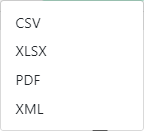
 . The following pop-up window displays: